

We do the shopping. You get the savings.
Customers love choice. And they love saving too! At Munn Insurance, we deliver on both. As an independent insurance broker, we shop our extensive network of insurance partners to provide our customers with choices to provide the best coverage at the best rate. Some of the insurance companies we search for our customers include:














Switch to Munn
It’s Simple 😉
Real people.
Our customers love to save.
Switching. Saving. Simple
We say switching is easy… and it’s true! In the past year, people have left these companies to come to Munn.
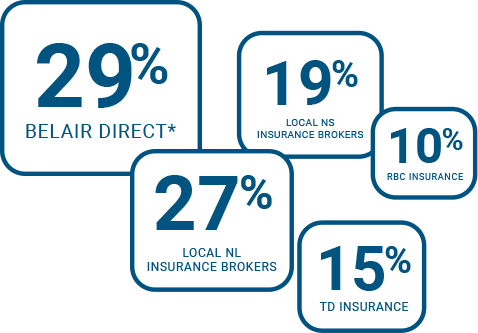
*Includes the old Jonson Insurance & Anthony Insurance brands
People are switching to Munn for many reasons.
Fast claims processing, competitive rates, and responsive, respectful customer care.

Customer Care
We have earned a reputation of always having your best interests at heart. That’s why we deliver truly exceptional service. The kind that makes you smile!

Fast Local Claims Service
We will guide you through the claims process, helping to ensure a swift and fair settlement by the insurance company. Getting you right back to where you were.


Competitive Rates
As an independent insurance broker, we work for you. We act as your personal advisor; providing unbiased advice on your individual insurance needs.

Broker Advantage
Not all insurance polices are created equal. As your broker, we work for you. And we make sure that you have the best coverage available. We answer to you.

More Complete Coverage
We have access to many insurance markets. Most places only have one! So we shop around on your behalf and find you the best insurance at the best price.

Our Latest Advice
Why Landlord Insurance Matters in Newfoundland and Labrador and Nova Scotia
Owning a rental property can be a great investment. It can generate income, build equity and become an important part of your financial future.
But it also puts a significant asset, and often an important source of monthly income, at risk.
A major fire, serious water loss, liability claim or extended period when the property cannot be rented can quickly become expensive. And if the property is insured as though it were simply a home you live in, you may not have the protection you expect.
That is why landlord insurance matters.
It is not just about protecting the building. It is about protecting the investment you have made in the property, the income it generates and your financial interests as the landlord.
For rental property owners in Newfoundland and Labrador and Nova Scotia, having the right insurance in place can make a significant difference when something goes wrong.
What Is Landlord Insurance?
Landlord insurance, sometimes called rental property insurance, is designed specifically for properties that are rented to tenants.
Depending on the policy and coverage selected, landlord insurance can help protect:
- The rental building
- Appliances, furnishings and other property you own at the rental
- Your liability as the property owner
- Lost rental income following certain insured losses
- Garages, sheds and other structures
The exact coverage varies by insurer and policy. The important point is that a rental property should be insured based on how it is actually being used.
Why Isn’t Regular Home Insurance Enough?
Home insurance is generally designed for a home you own and occupy yourself.
Once you rent the property to someone else, the risk changes.
For example, you now have:
- Tenants occupying the property
- Rental income to protect
- Different liability exposures
- Potential periods of vacancy between tenants
- Different maintenance and occupancy considerations
If you move out of your home and decide to rent it rather than sell it, do not assume your existing home insurance can simply stay the same. Talk to your insurance broker and make sure the insurer knows the property is now being rented.
The same applies if you add a basement apartment, purchase an investment property or change how an existing rental is used.
Rental Properties Face Real Property Risks
Rental properties face many of the same risks as any other home.
A fire can cause extensive damage. A pipe can burst. A windstorm can damage the roof. Water can enter a basement. A tree can come down during a storm.
And in Newfoundland and Labrador and Nova Scotia, landlords also have to think about the realities of Atlantic Canadian weather. Strong winds, heavy rain, snow, freezing temperatures and rapid changes in weather can all put stress on a property.
Good maintenance helps reduce those risks. Good insurance helps protect you when an insured loss still happens.
Water Damage Can Be Particularly Costly
Water is one of the biggest concerns for any property owner.
For a landlord, a water loss can affect more than just the building.
Imagine a pipe bursts in the middle of winter. There may be damage to:
- Flooring
- Drywall
- Cabinets
- Electrical systems
- Furniture or appliances you own
- Multiple units in a multi-unit property
Your tenants may also have to leave while repairs are completed — creating another potential financial problem: lost rental income.
Different types of water damage can be treated differently by insurance policies, so landlords should understand what water coverage they have and whether additional options are available.
Your Rental Income Is Part of What You Are Protecting
A rental property is not simply a building. For many landlords, it is also a source of monthly income.
If an insured loss makes the property unfit to live in, you may temporarily lose that income while repairs are completed. Your expenses, however, may continue. You could still be responsible for:
- Mortgage payments
- Property taxes
- Insurance
- Utilities
- Maintenance costs
- Other property expenses
Depending on your policy, loss of rental income coverage may help replace rent you lose because of an insured loss. That can be an important part of protecting the investment itself, not just the physical property.
It is important to remember that this is different from a tenant simply failing to pay rent. Landlord insurance generally does not guarantee your tenant’s rental payments.
Liability Matters Too
Property damage may be the first thing landlords think about when they think of insurance. Liability can be just as important.
Suppose a tenant, visitor or delivery person is injured at your property. Maybe they slip on an icy walkway. Perhaps a stairway railing fails. Maybe someone is injured because of a maintenance issue at the property.
If you are alleged to be legally responsible, you could face a liability claim.
Landlord insurance can include liability protection to help protect you against covered claims. That is particularly important for landlords because you are responsible for a property that other people use every day.
Atlantic Canadian Winters Create Additional Responsibilities
Winter can be demanding on rental properties in Newfoundland and Labrador and Nova Scotia.
Landlords should pay particular attention to:
- Frozen pipes
- Heating systems
- Snow accumulation
- Ice on stairs and walkways
- Roof condition
- Gutters and drainage
- Exterior stairs and railings
- Vacant units
- Emergency access to the property
A long cold spell can turn a small maintenance issue into a major loss. If a unit is vacant during winter, the risk can increase further because there may be nobody there to notice a heating failure or water leak quickly.
Your insurer may also have requirements relating to vacant or unoccupied properties, so always tell your broker if a rental will be empty for an extended period.
Older Rental Properties Can Require More Attention
Newfoundland and Labrador and Nova Scotia have plenty of older homes, and many make excellent rental properties. An older property is not automatically a bad insurance risk.
But insurers may want more information. They may ask about updates to:
- Electrical systems
- Plumbing
- Roofing
- Heating
- Oil tanks
- Foundations
- Windows
- Other major building systems
Properties with oil heat, wood-burning appliances or other features may also require additional information.
This is where working with an insurance broker like Munn Insurance can be particularly useful. Rather than assuming a property will or will not qualify, a broker can gather the details and look at the insurance options available.
Vacancy Between Tenants Can Affect Your Insurance
Tenant turnover is a normal part of being a landlord. Sometimes a new tenant moves in immediately. Sometimes the property sits empty.
Vacancy can affect insurance because an empty property presents different risks. For example:
- A water leak may go unnoticed
- A heating problem may not be discovered quickly
- There may be an increased risk of vandalism
- Maintenance issues can develop without anyone reporting them
If a tenant moves out and the property will be vacant, contact your insurance broker. Do not assume your coverage remains unchanged regardless of how long the property is empty.
Your Tenant Needs Their Own Insurance Too
A common misunderstanding is that the landlord’s insurance protects the tenant. It generally does not.
Your landlord insurance is designed to protect your property and your interests as the landlord. Your tenant should have their own tenant insurance to protect:
- Their furniture
- Clothing
- Electronics
- Other personal belongings
- Their personal liability
Tenant insurance may also provide additional living expense coverage if the tenant has to leave the property after certain insured losses.
Many landlords choose to require tenant insurance as part of the rental agreement. At a minimum, tenants should understand that your landlord policy does not replace insurance of their own.
Your Insurance Needs Can Change Over Time
Rental properties do not stay exactly the same. You may:
- Complete renovations
- Replace the heating system
- Add another unit
- Convert a basement
- Add a wood stove
- Switch to short-term rentals
- Move into one unit yourself
- Buy additional properties
- Have a property become vacant
These changes can affect your insurance. One of the simplest things a landlord can do is keep their broker informed. If the property changes, the insurance may need to change with it.
One Rental Property or a Growing Portfolio
Landlord insurance matters whether you own one rental property or ten. But the more properties you own, the more important it becomes to look at your insurance as a whole.
A growing landlord may need to consider:
- Different building types
- Multiple locations
- Different occupancy arrangements
- Different heating systems
- Total rental income
- Overall liability exposure
- Consistency of coverage between properties
- Deductibles
- Renewal dates
Your insurance needs may become more complex as your portfolio grows. That makes regular insurance reviews increasingly important.
Why Work With a Local Insurance Broker?
Rental properties in Newfoundland and Labrador and Nova Scotia are not all the same. Neither are landlords.
A local insurance broker can take the time to understand:
- What kind of property you own
- Where it is located
- How many units it has
- How it is heated
- Who occupies it
- Whether you own additional rental properties
- What coverage you want to protect your investment
As a broker, Munn Insurance can look at available insurance options and help you understand the coverage, rather than leaving you to figure it out on your own. And when your property or rental situation changes, you have someone local to call.
Your Rental Property Is More Than a Building
For most landlords, a rental property represents much more than four walls and a roof.
It may represent a substantial financial investment, years of mortgage payments and renovations, an important source of monthly income and part of your long-term financial plan.
One significant loss can affect all of that at once.
Damage to the building can be expensive to repair. A tenant may have to move out while repairs are completed. Rental income can stop. Liability claims can create additional financial exposure.
That is why landlord insurance matters.
The right coverage helps protect not just the property, but also the income and investment connected to it. And just as importantly, your insurance needs to reflect how the property is actually being used today.
If you own a rental property, are preparing to become a landlord or are growing an existing rental portfolio, make sure your insurance is keeping pace with what you are building.
Protect Your Rental Property With Local Insurance Experts
Munn Insurance helps landlords throughout Newfoundland and Labrador and Nova Scotia protect their rental properties and understand their insurance options.
Whether you own one rental home or a growing portfolio, our local insurance experts can help you find coverage that fits your property and your situation.
Get a landlord insurance quote today.
Visit: munninsurance.com/landlord-insurance-program/
Call: 1-855-726-8627
Protect the property. Protect the income. Protect the investment.
Cybersecurity in the News: What NL and NS Businesses Should Know About Their Risks and Insurance
Recent cybersecurity concerns and website shutdowns are a timely reminder [...]
9 Things to Consider Before Your Commercial Auto Insurance Renewal
Your commercial auto insurance renewal should be more than a [...]
How Much Does Landlord Insurance Cost in Newfoundland and Labrador and Nova Scotia?
If you own a rental property, or are thinking about [...]